• Link to Facebook
  • Link to Mail
  • Link to Youtube
  • Link to Skype
  • English English English en
  • Español Español Spanish es
  • Français Français French fr
  • Română Română Romanian ro
  • Português Português Portuguese (Brazil) pt-br
  • Shopping Cart Shopping Cart
    0Shopping Cart
SECURITHOR Monitoring Software
  • Home
    • News – blog
  • Features + Description
    • Features list
      • Description
      • Panic buttons
      • Email – SMS- Maps
    • Network Edition
    • Web features
      • Web for subscribers
      • Weboperator
      • STM Mobile Web Viewer
    • Workspace – The many faces of Securithor
    • Reports and stats
    • Packages and requirements
  • Track & Dispatch Mobile Staff
  • Download
    • Get a demo
    • MCDI Catalog
  • Catalogue
  • Contacts
    • Contact SECURITHOR Team
    • Purchase SECURITHOR
    • About us !
    • Training
      • Training Videos
      • FAQ
  • Click to open the search input field Click to open the search input field Search
  • Menu Menu

Powerful Reports and Stats Module to make business decisions for your Central. At no extra cost, Standard in v2

OFFER MORE SERVICES WITH REPORTS & STATS MODULE

SECURITHOR V2 new reports section helps you set reports for your customers. Create your layout, set a schedule and automatically send reports to your subscribers. Report can be customized for a single customer or batch for many.  Reports are sent by email or output to file without operator intervention. This completely automatic process can be schedule along the day or at off hours. Layout of the report can be designed using a report builder. Control the look of the report, include your logo, choose document size, include watermark… all possible with the new report section.

REAL STATS FOR YOUR CENTRAL

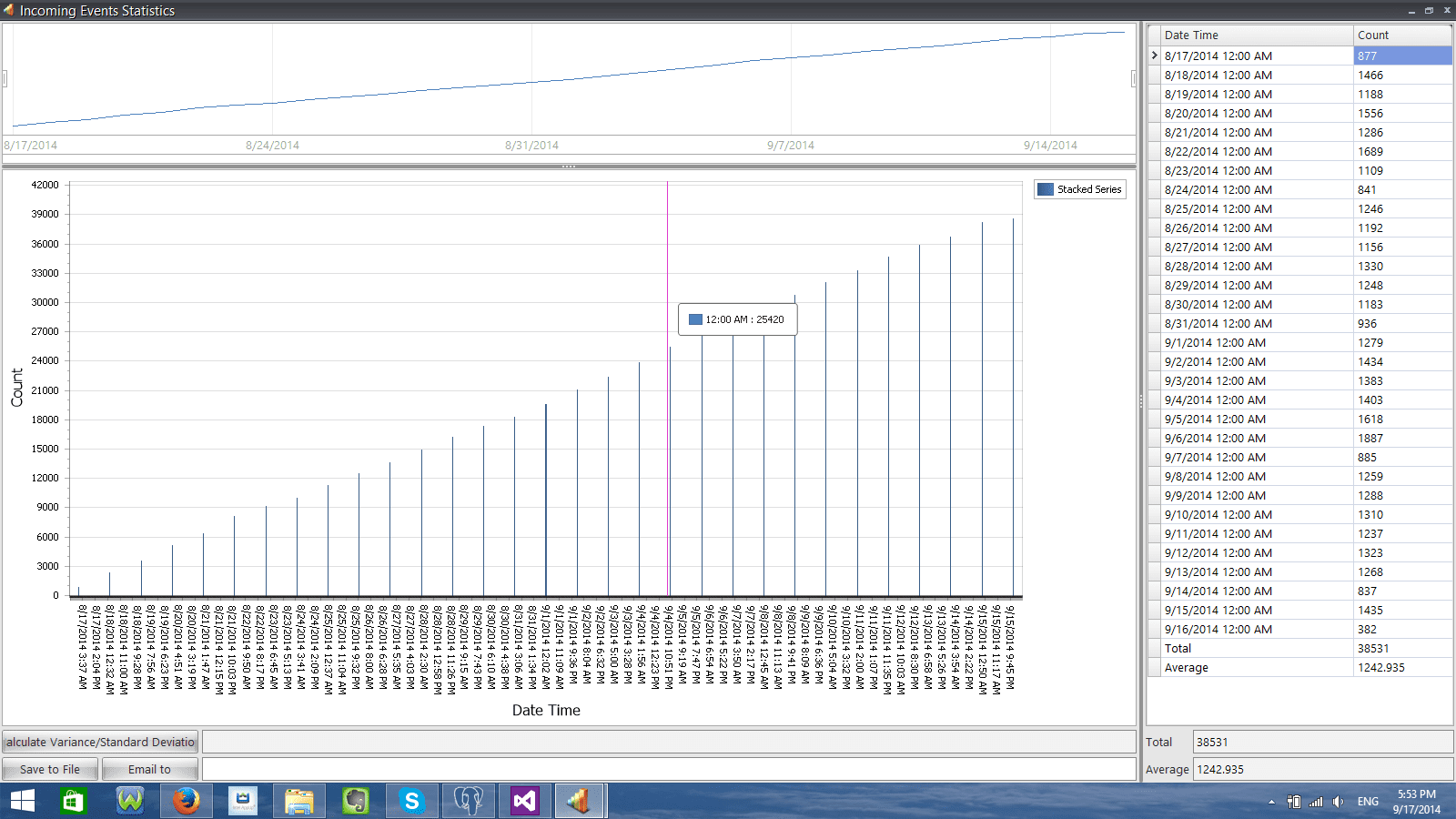
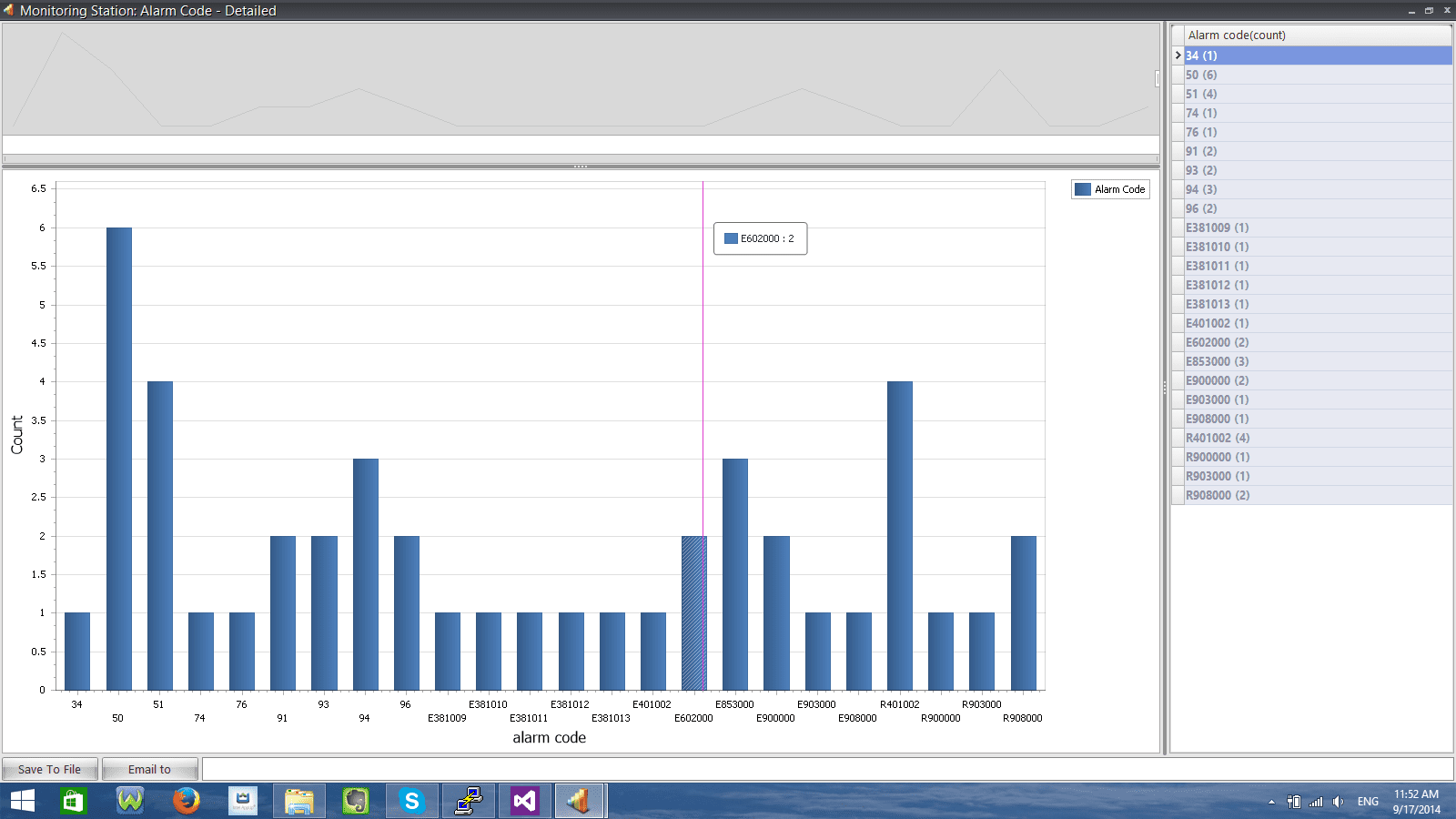
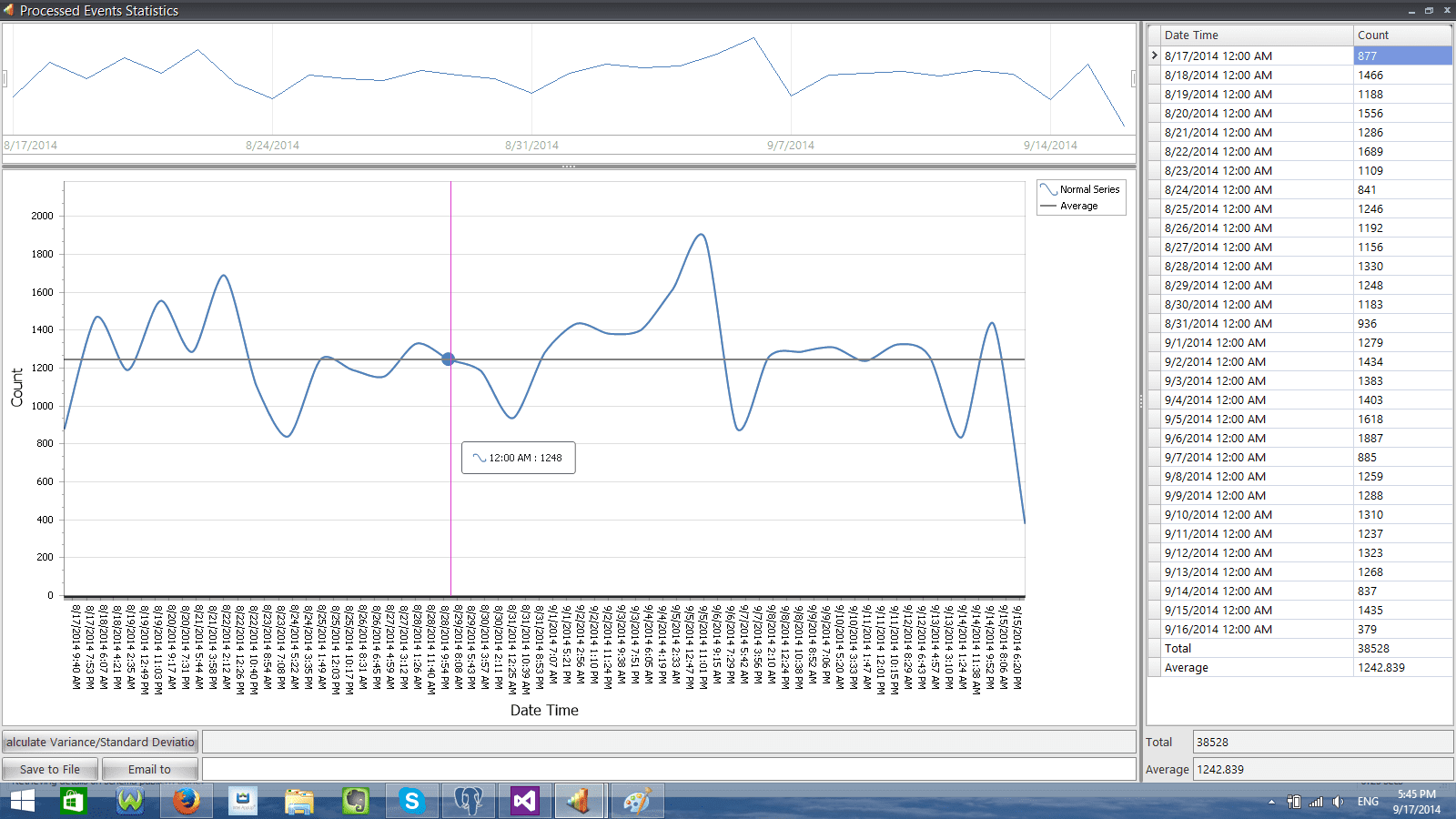
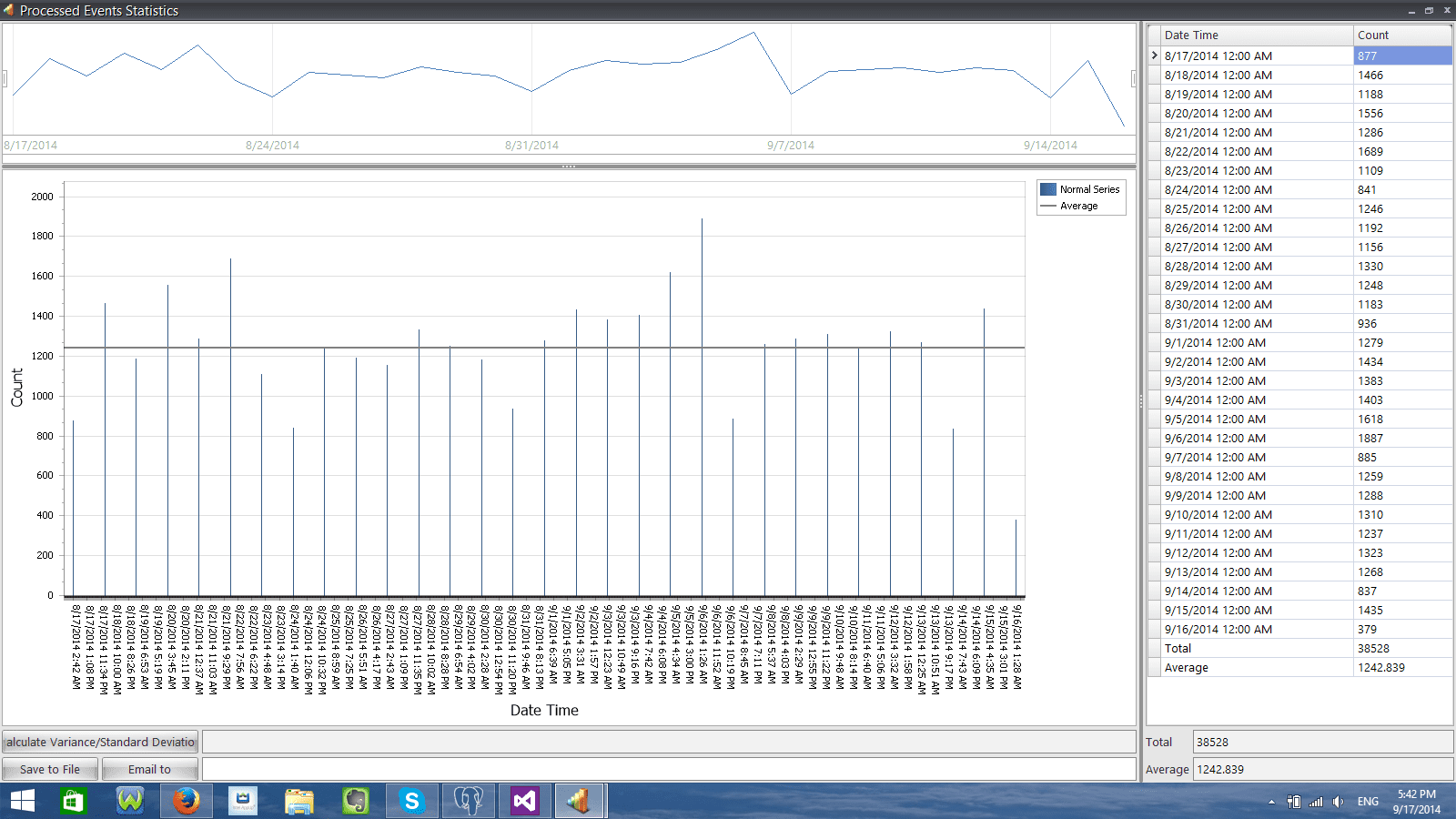
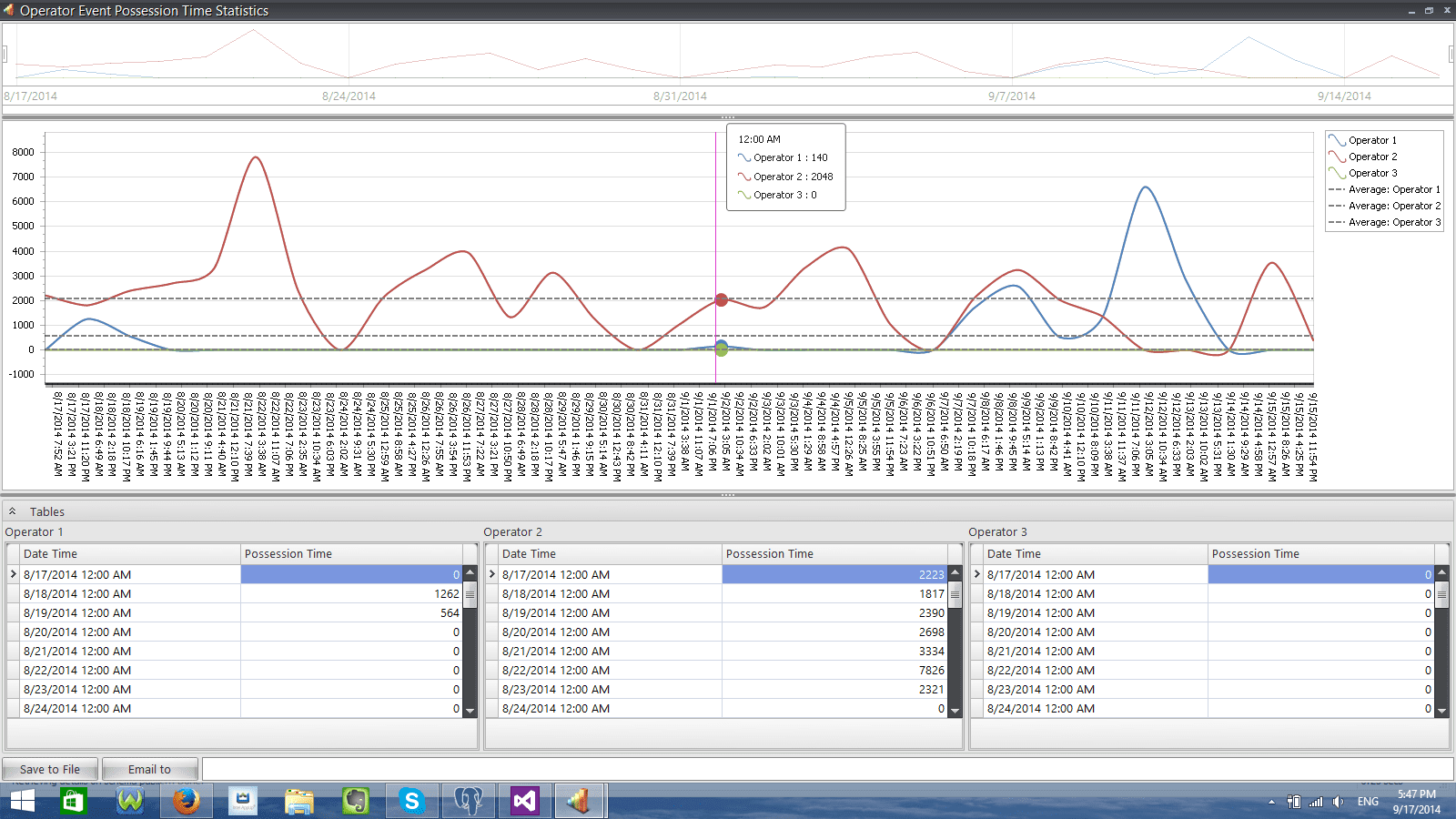
SECURITHOR stats module is made with the Central owner in mind. Real stats on your Central’s performance are available. Know the distribution of alarms during the day to identify peaks clearly. See clear distribution of alarm events per input channel and Know precisely the type of alarm events you are getting in a easy to understand chart.  Operator stats  will tell you who takes more time to process alarms, who handles more of a certain type. You can even compare the work of several operators. For advanced analysis, more descriptive statistic tool are available such as standard deviation, moving average and median Reports and stats module is standard with SECURITHOR v2. 
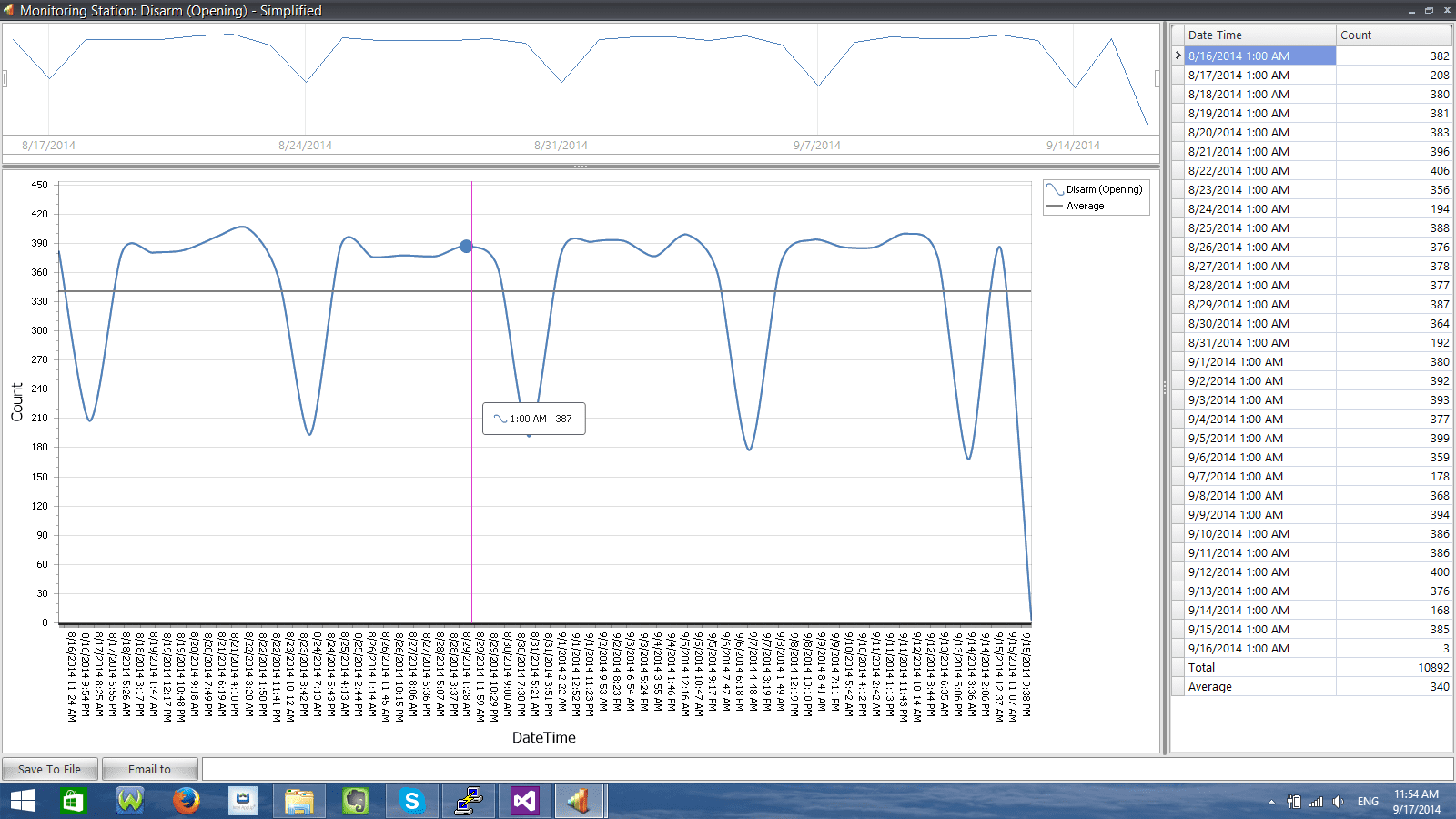
Report, Spline View
Report, Spline View
Report, stacked bar view
Report, Standard Spline View
Report, Standard Bar view
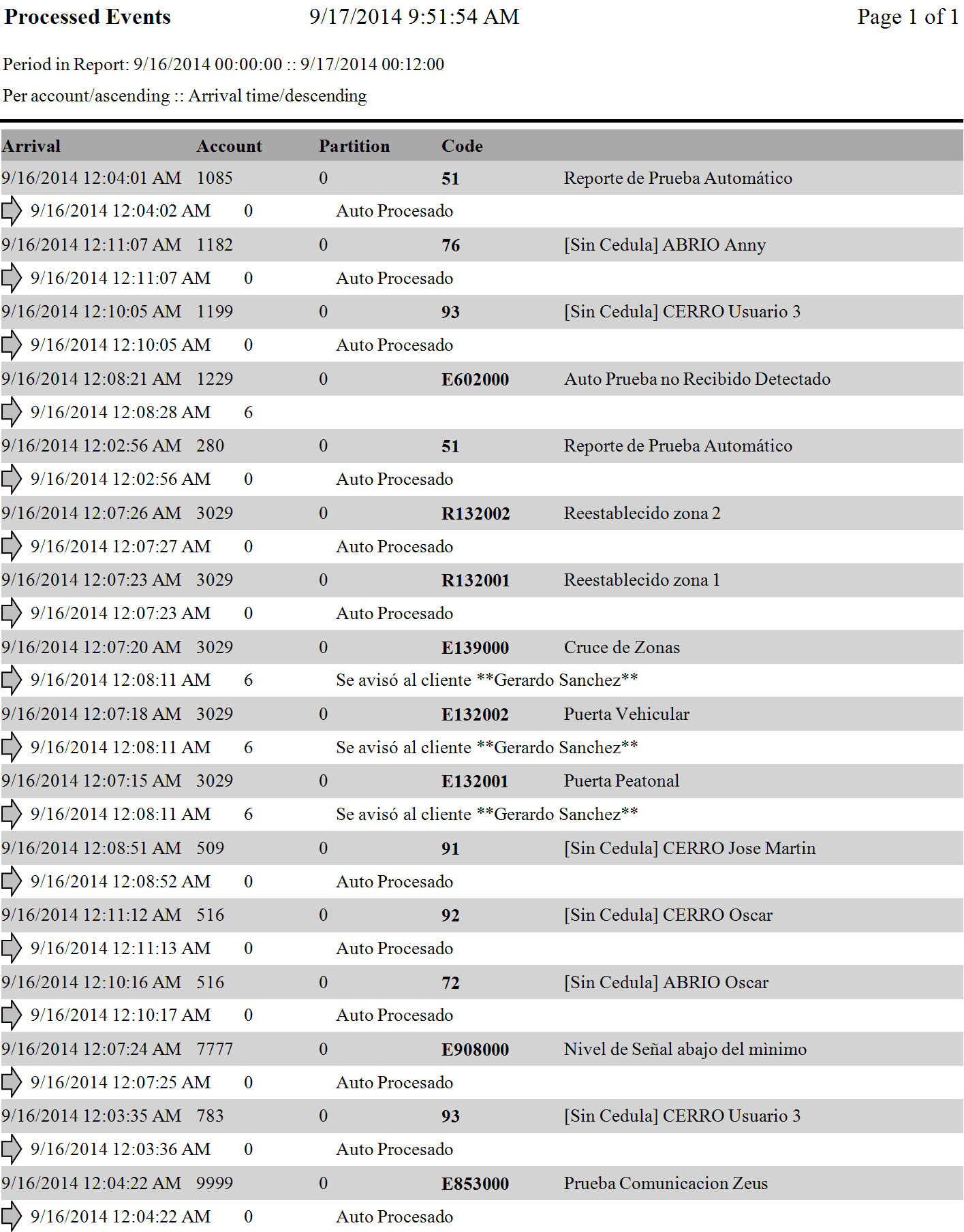
Report Scheduling in Reports and Stats Module
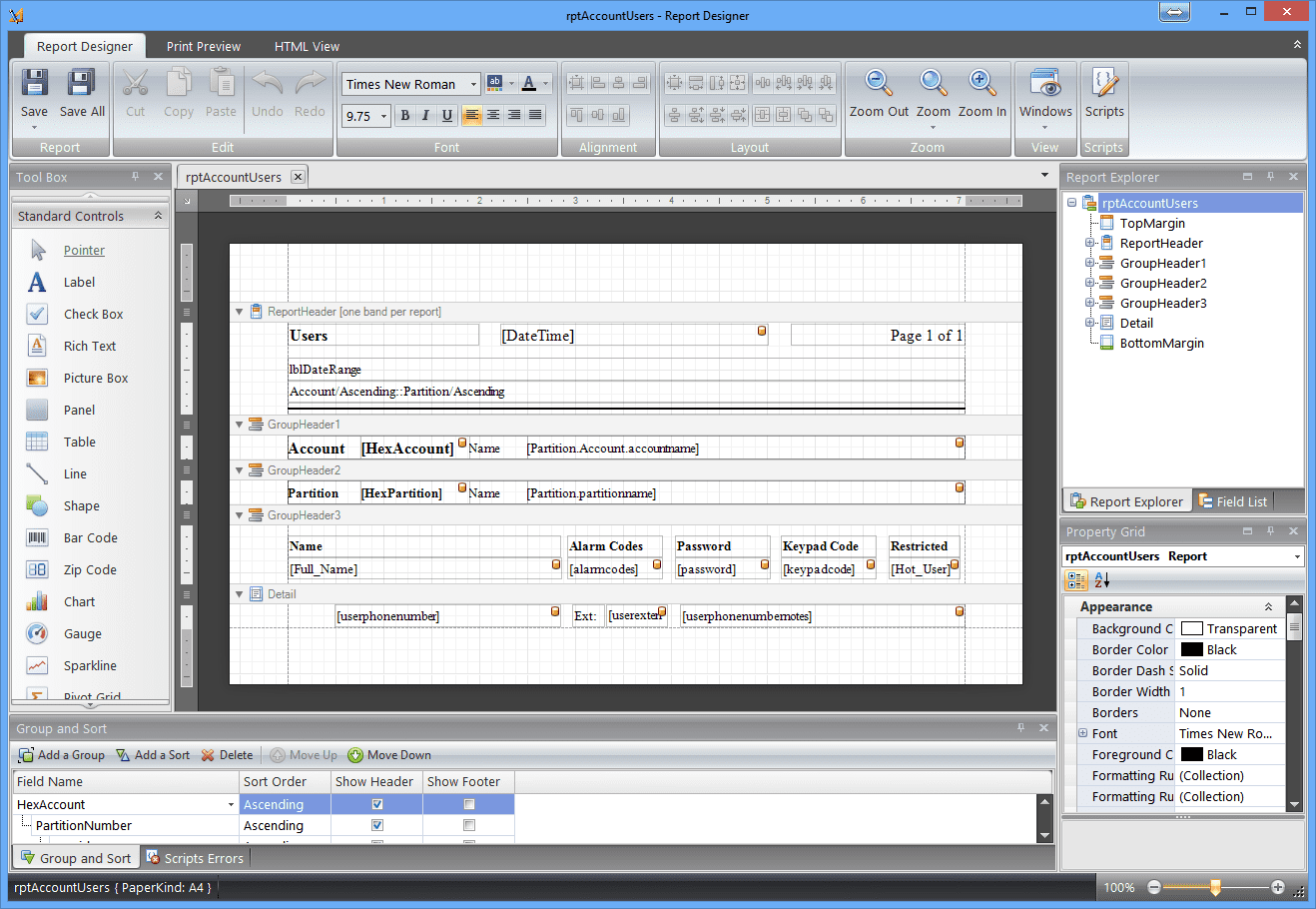
Make your own report with Layout Designer

EXTENSIVE STATS

Know more about your Central station operation and Operator performance.

The Stats section lets you know about your Central performance. If you want to know your peak times or analyse per alarm code, this is the tool. You can produce a distribution graph for the hour, day, week, month or year. Refine your search criterias easily by applying filters. 

Operator will not have rest because you can analysise their performance in detail.

Processing time. Filters

Comparator tool will help you compare the response time or 2 operators.

95x51_4

POWERED BY PostgreSQL
Reports and stats section makes great use of PostgreSQL, the database engine for SECURITHOR. PostgreSQL proves to be very apt at handling big chunks of data such as the many daily events of a Central station. It can crunch to months of data to give you a clear picture in a very short time.

PostgreSQL respects the 5 S we are looking for: Strength, Stability, Scalability, Security and Speed. 

PostgreSQL is fast, able to handle big data and it’s open source. This means there is no acquisition cost yet there’s a large community of developers to enhance and support it. Choosing PostgreSQL helps keep acquisition costs down because you don’t have to purchase a pricy SQL license on top of your CMS software.  PostgreSQL is an open-source object-relational database system that runs on all major operating systems including Windows, Linux, Unix and Mac OS X.
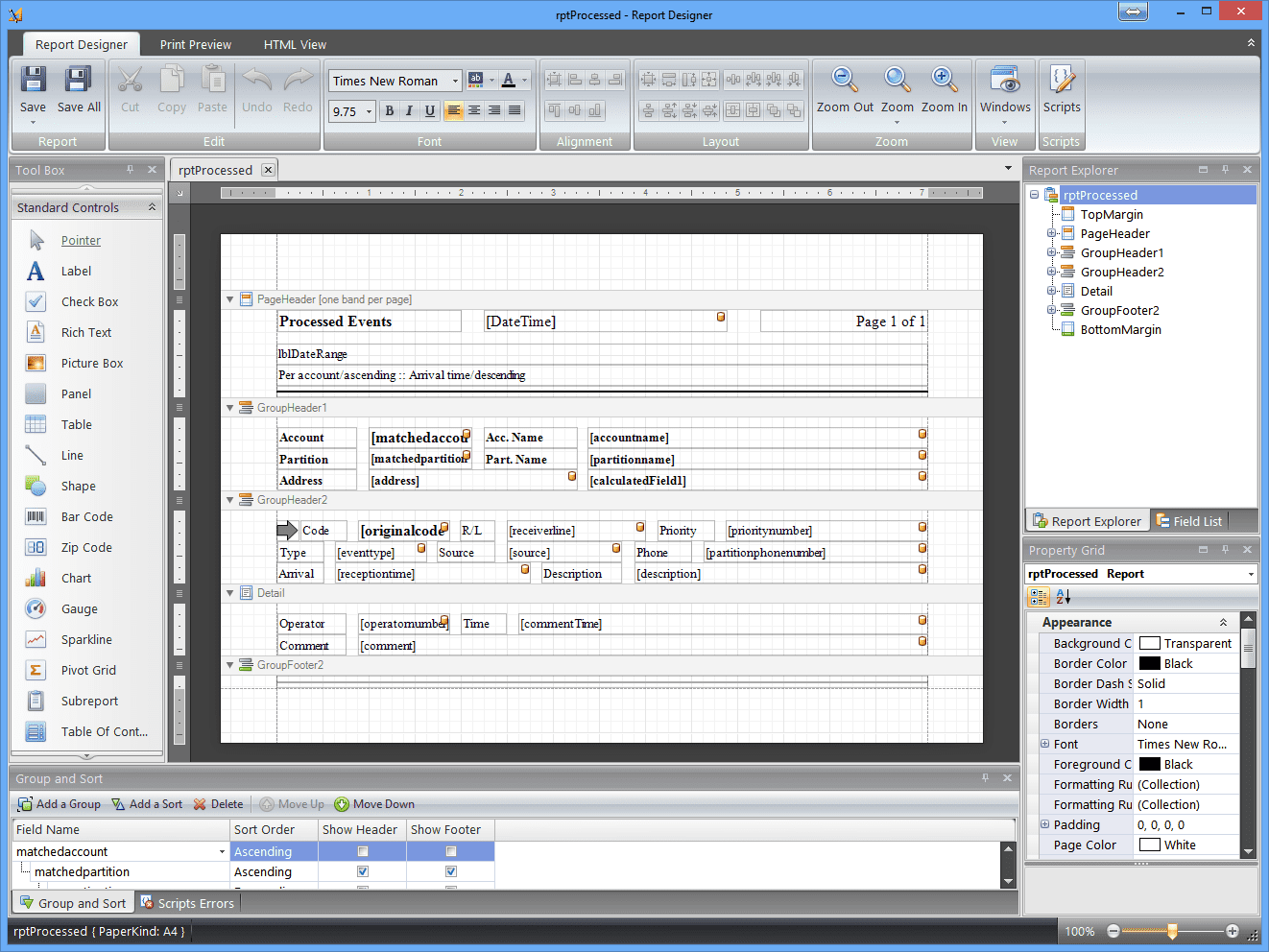
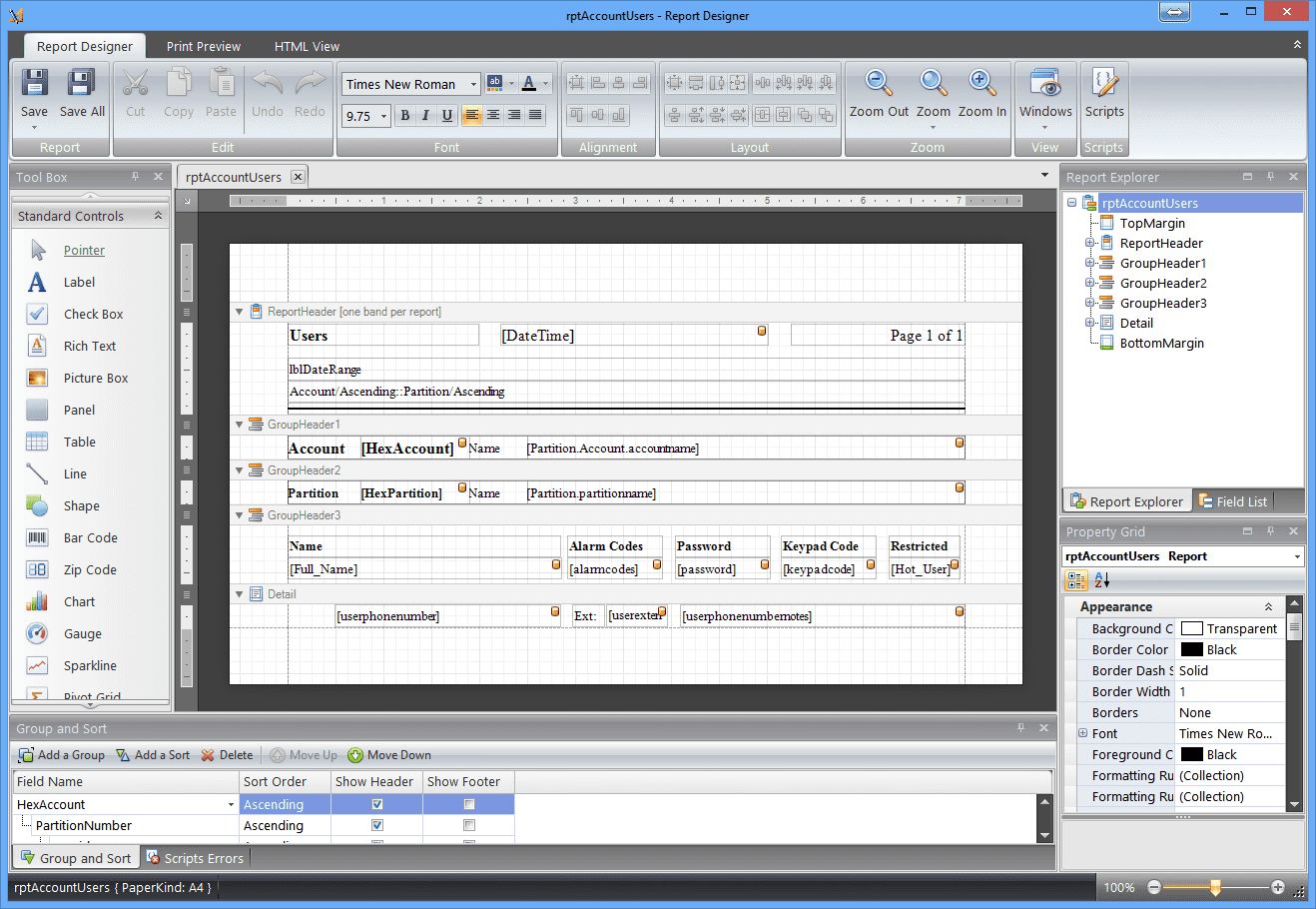
Make your own Layouts

With v2 Reports and Stats you can make your own layouts. Prepare the page the way you want it with your own logo, header, footer. Include images or even bar codes to make a report personalized for your Central.

Insure you get a completely personalized layout by adding your own logo and even a watermark that will make the report hard to counterfeit. With SECURITHOR v2 your customers are not just receiving list of events but a personalized report with your Central Station image.

Choice of A4 or Letter paper size. It’s also possible to prepare custom paper size through layout properties.


Many outputs formats

Reports and Stats are viewable many ways. You can have quick view from the on screen viewer or can select output to emails and files. Each email can get an attached file. You select from pdf, xml, rtf, txt or csv files. Same selection is also available to save files.

Keeping old favorites

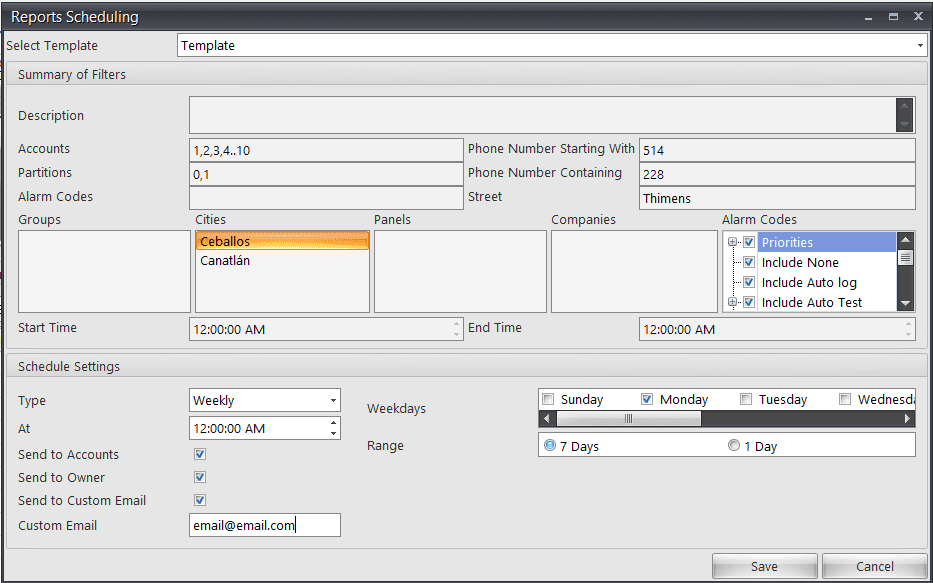
You may have use MCDI software for more than 15 years and you could not do without your WinSAMM or SECURITHOR reports? Well, they are all available from v2 Reports and Stats.

Report Scheduling in Reports and Stats Module
Layout Designer - Processed Events
Make your own report with Layout Designer

USE IT FROM ANYWHERE
Reports and stats module is installed by SECURITHOR but runs as a separate application. You can use it from anywhere in your Network. It does not have to be on your SECURITHOR Alarm Processing computer.

You can run as many instances of Reports and Stats module as you have Operators stations even if you not bounded to use R+S on Alarm Workstations.

This is really useful is you make heavy use of R+S module. It will alleviate the load on your main Alarm computer. 

AUTOMATIC SENDING

Use a template of make your own layout and just schedule the reports. SECURITHOR will send it for you by email to your customs at time you choose.

It’s easy to send daily reports to your customers.

Automatic as in absolutely no operator intervention to send reports!

Custom content is possible and can be arranged for single customer, groups or even all customers.

CUSTOM REPORTS SERVICE
If you absolutely want a report but do not see if in the many provided by the Reports and Stats section, MCDI can do it for you.

We also offer customization services if you want a specific layout or elements you do not see in the layout editor.

MCDI developers can make a custom reports for you, even from parameters that are not readily available in the Module.  Contact SECURITHOR staff with a description of your report. We will make an assessment usually within one business day.

There is so much more in SECURITHOR. Here’s a sample of features.
You can also check the Youtube videos for a comprehensive walk through of SECURITHOR

  • Powerful data grid view

    Traffic windows data grid view is not only a list of the traffic. It’s the most advanced search box available to sort, find, filter alarms.

  • Transfer alarms

    Easily transfer alarm event to another operator.

  • Sounds

    Wake up operators! Each incoming signal is assigned a sound according to priority level. Know right away when fire or panic signals are coming.

  • Colour!

    Easily see event priority by the colour in traffic form. Each priority level is given a colour so it’s easy to grasp event type even if you have hundreds per minute.

  • Search armed/disarmed

    Your subscribers are always calling to know if their system is armed? Easy search of the status in SECURITHOR. Subscribers can also check using WAM.

  • GPS trail

    See position trail on map when receiving ‘follow me’ signals from subscribers APS Panic button for Android or iPhone

  • Stats on operator

    Know which operator handles most alarms. And know which one is faster per intervention with the Stats Module

  • Map with each account

    Map is indexed for each account. Either from the address of from a gps location if you set-it.

  • Hearbeat from alarm receiver

    Constant supervision of alarm receivers. If receiver stops sending signals for 30 seconds you are notified.

  • Skype call from ST

    Automatic dialing in Skype by click of a button. Number if transferred to Skype if it’s your preferred phone provider.

  • Auto dialing

    With a connected modem you can dial phone number directly from SECURITHOR. Faster and safer.

  • Updates

    SECURITHOR is under a continuous improvement program. Updates are included in your support coverage.

  • Medical identification

    Alarm codes flag for medical available. Alarm processing window show the icon so operator knows right away it’s a medical emergency.

  • Multiple languages

    We can add your translation easily If you don’t see your language among the many already in SECURITHOR.

  • Delay processing

    You can put an event in pending list. It will be represented after a few minutes. Very useful to verify a false alarm or to prioritize your interventions.

  • Replication

    We can set many replication of the database. From Live backup module to Web Access Module, many levels of redundancy are possible

  • Comment

    Operators can write a comment for each alarm. Comment is tagged to the event so you will know what was done if you review the event months later.

  • Manual pick up or automatic distribution

    Let operator pick alarms or automatically dispatch according to priority level and arrival time.

  • Audit trail

    Every operator action in SECURITHOR leaves a trace.

  • Illimited accounts

    ST1 and STS versions do not have account limitation. You will not need to pay a tax to make your Central grow!

  • Pictures

    You can attach pictures to each account. Add floor plan or rear and front picture so you can guide intervention teams.

  • Automatic image selection

    Tag one of the images to an alarm code. When this alarm code comes in for this subscribers the right image will pop. Match alarm code and zone number to an image

  • Groups

    Assign an account to a group: to an installer, to a dealer or to a major customer. Group all accounts or a store chain. This will allow more control for web features.

  • Remote maintenance

    SECURITHOR comes with free tools for remote maintenance. You start the applications and give codes to MCDI for remote access. MCDI developers can update and troubleshoot as if he was in front of the PC.

  • Multiple displays allowed

    You want to see anything at a glance. SECURITHOR works with multiple displays

  • Operator permissions

    No limit to number of operators. Multiple level of permissions set per operator from simple to complete rights on the system.

  • Hot keys

    Hot keys can make your alarm processing faster than just using a mouse.

  • Automatic back-up

    SECURITHOR will make an automatic back up to a disk (even Network) at interval you select.

  • Live back-up

    Live back-up module can be added. Will allow operators to switch rapidly to a second system in case of emergency. MCDI can restore operation on secondary back to main.

  • Online tutorials

    Many video walk through available on Youtube.

  • Better performance

    V2 is faster than v1 by at least 30% due to new programming tools and new SQL developments.

  • Multi processing

    Process multiple events of same kind for an account in one batch.

Pages

  • About us !
  • Coming soon!!
  • Contact SECURITHOR Team
  • Download SECURITHOR trial
  • FAQ
  • Features and description
  • Get Support for SECURITHOR
  • Get Support for SECURITHOR
  • MCB – Track and Dispatch Mobile Staff
  • Migrate to SECURITHOR
  • Network Edition – Features
  • News flash – Blog
  • Packages and requirements
  • PRIVACY policy
  • Purchase SECURITHOR
  • Reports and stats
  • Schedule a walk-through demo of SECURITHOR and Mission Control
  • Securithor Home
  • Web modules: WAM, Weboperator and STM
  • Workspace – The many faces of SECURITHOR

Categories

  • Alarm Receivers
  • Blog
  • DISPATCH
  • Events
  • MCB Mission Control Board
  • News
  • Panic buttons
  • SECURITHOR
  • Tool Tips
  • Uncategorized
  • Updates
  • Web Modules

Archive

  • January 2026
  • March 2025
  • August 2024
  • March 2024
  • October 2023
  • August 2023
  • September 2022
  • April 2022
  • March 2022
  • December 2021
  • November 2021
  • September 2021
  • August 2021
  • February 2020
  • November 2019
  • September 2019
  • August 2019
  • August 2018
  • April 2018
  • March 2018
  • February 2018
  • January 2018
  • April 2017
  • September 2016
  • July 2016
  • June 2016
  • March 2016
  • August 2015
  • July 2015

Our locations

Montréal Canada:
MCDI SECURITY PRODUCTS INC.
6556 boul. MONK
Montréal QC CANADA H4E 3J1

Phone:
English/Français: +514-481-1067
En español: +514-487-0441

Skype: mcdi-hq
securithor@mcdi.com
support@mcdi.com

MEXICO/LATAM
En Durango:
Ventas: +52 618 170 8885
ventas@mcdi.com

Soporte Tecnico en español: soporte@mcdi.com

PORTUGUÊS
All português speaking countries:
SANCO PVT
+351 223 710
sanco@sanco.pt


  • SECURITHOR V2.7.1 change list2026-01-04 - 16:03

      Table of Contents 1. Introduction & Core Services DT42 as a Service: DT42HV Hosting and Capacity Major 2.7.x Reworks, New Key Features: Localization & Language Support Streamlined Configuration & 64-bit Architecture Dynamic Data Creation 2. Add-On Modules General Licensing & Update Rights Major Changes & Discontinuations: APS to Protecthor Transition API & Odoo Plugin […]

  • Many new features in SECURITHOR V2.6!2025-03-10 - 00:57

    As usual, a new version of SECURITHOR brings many new features. And some Old favourites have been improved. Major new work done in 2.6: Following the announcement of our partnership with the Kingfisher Company, we made a new MQTT receiver dedicated to the Kingfisher IoT platform. Kingfisher is a prominent manufacturer with a 60-year history […]

Business Hours

MONTREAL: 8-18 EDT/EST

MEXICO: 9-18 CDT

Support contract holders with extended or 24H coverage receive dedicate phone number and emails for outside business hours.

Contact MCDI securithor@mcdi.com to know more about support coverage options:
Business hours / Extended 8-22H / 24H

Tags

Alarm Receivers, Monitoring Station, Panic Button Android, Panic Button iPhone, ARC, Alarm Receiving Centre, Central Station, Security, Monitoring Software, Contact ID, SIA, Video Verification, Web Access, Alarm PCI board, Alarm card, Visual Alarm, Maps, Zone, Detector, SAMM, WinSAMM, TLR, TLR+, Exprecium, Decrypta, Récepteurs d'alarmes, Central d'alarmes, PC télésurveillance, Baie de réception, Alarmes, sécurité, surveillance, Alarmes, Soft de monitoreo, Alarmas, Receptora de alarmas, Seguridad
© Copyright - MCDI Security Products Inc. 2025 - Enfold Theme by Kriesi
Scroll to top Scroll to top Scroll to top