
TRACK and DISPATCH your mobile staff with Mission Control Board

MCB Mission Control Board locates staff and organizes dispatch of jobs, no matter if they are Patrolmen, Fire Trucks, Technicians or Deliverymen.

As it also works as a plug-in for SECURITHOR, an alarm signal can be transferred to mobile staff.

Mission Control Board works with the MCB Android app to locate and provide interaction between your base station and your mobile staff. 

Know where your employees are, who is available, geofence them, send them missions, dispatch them on surveillance tours or visit/delivery itineraries.

Get proof of presence to your customers and enhance your services by sending them documented reports which include pictures and videos taken by your visiting staff. 
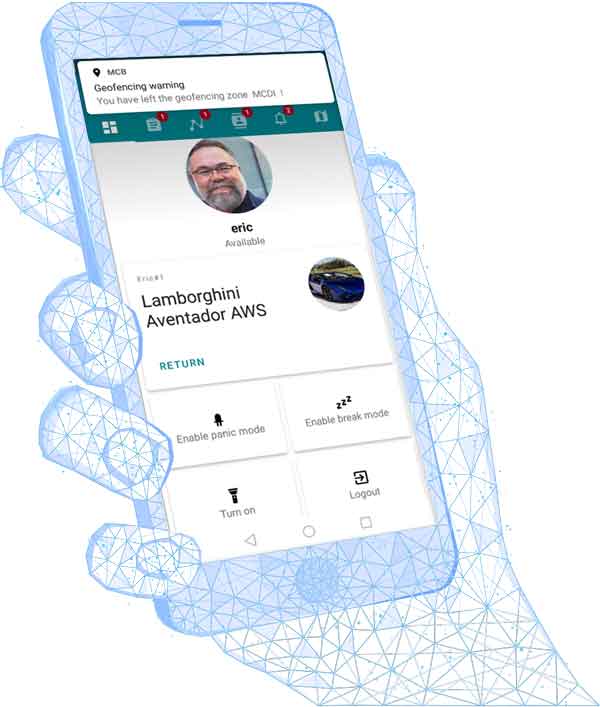
The MCB app

SCHEDULE A DEMO

We can walk you through Mission Control and its interaction with SECURITHOR. Schedule your demo directly in our Calendly Scheduler

RESPOND FASTER

Send alarms coming to SECURITHOR directly to staff phones with MCB Mission Control app.
It’s precise because you know who is the closest and who has the skills to respond.

DISPATCH

Automatic or On Demand.
NO matter if set to automatically respond to an alarm signal coming in SECURITHOR or On Demand when your operators see fit.

Or send a mission unrelated to an alarm from the MCB Interface.

PROVE

Prove the presence of your staff in numerous ways with MCB.  Geolocation is captured at each important step of Missions or Tours. Double is with a request for signature at the site, scan of a barcode, QRcode or even NFC tags at the checkpoint.

Plus numerous tools to find who was where and when.

UNIFIED SOLUTION: MCB+SECURITHOR

No need to retype intervention information in another software. High integration between SECURITHOR Alarm Response Software and Mission Control Board allows for alarm signals to be automatically dispatched from one to the other, or for operators to assign staff to respond. Plus SECURITHOR accounts and partitions are used to build itineraries for tours in Mission Control Board.

Staff response is logged with the alarm event in SECURITHOR including their report, pictures and recordings.

Plus site information such as location, contact name, and checkpoints are coming from SECURITHOR. No need to retype the site info when assigning a mission or building an itinerary for tours in Mission Control Board.

LANGUAGES

MCB is published in several languages, and available from a list directly in the operator interface of MCB. Your operators can work in the language of their choice. Mobile staff also get the Android app in the language of their phones.

Don’t see your language? It’s easy to add another one. Simply contact MCDI to receive the language file. We can add your translation to MCB at no charge. We even give a free module in SECURITHOR if you contribute a language.

  • SECURITHOR

    Process Alarm

  • SECURITHOR

    Dispatch Alarm

  • MCB app

    Staff receives Mission

  • MCB+SECURITHOR

    Tracking staff on the way to checkpoint

  • MCB app

    Staff returns report

  • SECURITHOR

    Intervention info shown to operator

NOT ONLY FOR PATROLS AND GUARDS

Every company with mobile staff can use MCB or MCB Go!

No matter the type of staff you have, if they are mobile, MCB is for you. Track and Dispatch trucks, salesmen on the go, cleaning crews, building managements, equipment service techs, meds delivery, etc..

Track them through their itineraries and see their checkpoint completion live on the dashboard map. Both MCB and MCB Go! simply track your employees with the MCB app from their Android phones.

If you use MCB as a plugin for SECURITHOR, It’s easy to make the itineraries from your SECURITHOR accounts. You can create your checkpoints without SECURITHOR If you are using the stand-alone version MCB Go! It works with clients, sites and checkpoints to associate QR codes and NFC tags.

Both MCB and MCB Go! simply track your employees with the MCB app from their Android phones.

PATROL and TOURS

Plan visits, guard tours, delivery runs, pick-up routes or follow salesmen on the road.

Request a signature at the site, or have your staff scan QR Codes, Barcodes or NFC tags to double prove their visits. Using NFC tags, you can de facto force a tour to insure patrols visit all the dark corners, not just show up.

Add QR code to devices to confirm them. MCB app scans the device at the checkpoint to insure you have the right one. Impose a duration stay at site to insure the job is well done.

GEOFENCES

Make geofences to know when staff leaves or enters zones, either authorized or forbidden. Design zones as you see fit or use geographical entities such as boroughs, and cities.

An authorized zone insure a guard stays at his posting during a shit as you can make rules for staff and schedules, per zone.

A forbidden zone alerts you if staff enters an area or leaves territory.

FILTER DISPATCH

Filter dispatch according to the skills of your staff or match them to mission requirements.
Automatically from SECURITHOR or manually from MCB.

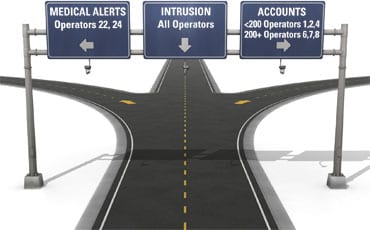
ST_filters_highway-signs

Missions, Jobs, Checkpoints, Itineraries, Visits, Deliveries, Pick ups, Tours, etc… 

MCB makes sure you know which of your employees are available and dispatch them where you need the job done, no matter how you call this job. 

You can prepare itineraries for scheduled work with both MCB plug-in for SECURITHOR or the stand alone version MCB Go! 

It’s not limited to Guards and Patrolmen. Use itineraries for Delivery Men, Alarm System Installers, Mainfftenance Staff, Repairmen, Visiting Nurses, School Bus pickup routes etc.. Organize routes for them and get ficheckpoint arrival confirmations, reports, picture or video proof. 

Multiple features give you control on your mobile staff such as vehicle pairing and Geofencing of both authorized and forbidden zones. 

Confirm your staff presence with automatic reports to your customers including both geolocation and confifirmation of NFC or QR code scans. 

There is so much more in Mission Control Board. Here’s a sample of features.
You can also check the Youtube videos for a comprehensive description of MCB.
Or ask us for a 
walkthrough demo.
Also have a look at the Brochure

  • Transfer alarms

    Easily transfer alarm events to staff directly from SECURITHOR

  • Stats on operator

    Multiple efficiency reports on operators

  • Multiple languages

    We can add your translation easily If you don’t see your language among the many already in MCB

  • Auto Backup

    MCB makes automatic daily backup once per day.

  • Delayed Missions

    Assign missions stat or for later in the day

  • Many ways to search staff locations

    MCB offers many ways to search where your staff was: on specific days, per mission, per location

  • All in a MAP

    The Dashboard map gives you a lot: staff locations, their current status, available cars, geofences and checkpoint locations

  • GPS trail

    Staff are tracked when using the MCB app. Review trails on maps

  • Unlimited accounts

    MCB sites are the SECURITHOR accounts. So unlimited accounts and partitions!

  • Staff notifications

    Send notifications to all staff. Such as request for backup or important traffic warnings

  • Vehicle assignation

    Assign cars and trucks to staff. Indicate who is a driver, who are the passengers

  • Videos

    Videos can be uploaded with Mission our Checkpoint reports. They are kept as attachment with Mission or Itinerary Checkpoints

  • Private chat rooms

    Chat room between operator and staff or between staff

  • Flashlight

    Flashlight on/off from the MCB app

  • Schedules

    Schedule missions or tours as you want. Repeated by interval, days, weeks, etc..

  • Integration with SECURITHOR

    Missions sent from SECURITHOR to MCB return staff reports to SECURITHOR including pictures and videos. All tagged with the event in SECURITHOR.

  • Manual dispatch or automatic distribution

    Let operators dispatch important alarms from SECURITHOR or automatically dispatch based on preset criteria

  • Remote maintenance

    SECURITHOR comes with free tools for remote maintenance. You start the applications and give codes to MCDI for remote access. MCDI developers can update and troubleshoot as if he was in front of the PC.

  • Automatic back-up

    MCB will make its own backup once per day

  • Pre-written comments

    Staff can choose from the multiple pre-written comments you define. No need to retype the most used ones.

  • Important events

    A log list shows all important information: geofence offense, car return, staff getting on/off the grid, etc…

  • Pictures with mission orders

    You can transfer pictures to your mission so staff have practical references

  • Avatars and pictures

    Add pictures of your staff to recognize them. And pictures of cars to see right away which model is assigned to a staff member

  • Teams

    Assign a team when you need to send a response force. With Team leader and crew members

  • Multiple displays? Yes

    You want to see anything at a glance? MCB works with multiple display e.g. have the dashboard on one, the jobs listing on another

  • Remaining battery charge

    Battery level of each staff member is viewed with their location so you can judge if they have enough battery time for the mission

  • Online tutorials

    Many video walkthrough available on youtube.com/securithor

  • Multi processing

    Send multiple jobs because multiple operators can work simultaneously