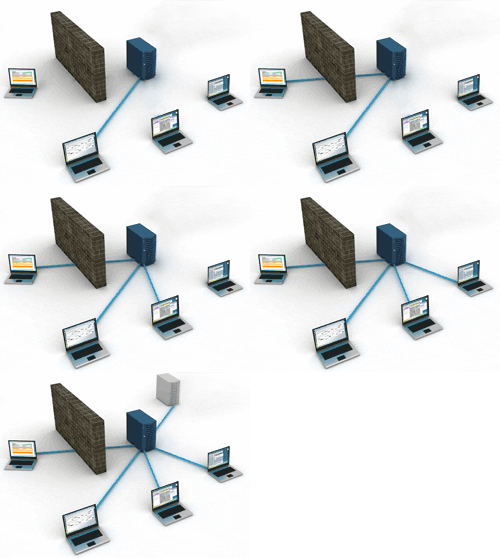
NETWORK operation can be customized to fit your Central station needs.

FLEXIBILITY BRINGS PERFORMANCE

All features of ST1 and more
If you started with ST1 you can easily upgrade to Network. No need for database conversion.
Database structure of the Single station and Network Edition is compatible.

All features of the ST1 version are included in the Network Edition. Check the Features page to have a complete list.
Several features are added to the Network Edition such as STM, PPP and Dispatch Filters.

It’s also compatible with the Live Back-up module and all SECURITHOR Web Modules.

Network Edition gives you the flexibility to start the SECURITHOR graphical interface from any PC connected.

SCALABLE
SECURITHOR is built to follow your CMS not the other way around. Start with a Server and connect stations as you need them. Number of connections is marshalled on the server so you can install the SECURITHOR Client in many PCs. Connect only when you need for a concurrent number of PCs-

You can plan your network installation ahead and spend only when you need it. Scalability also means you can operate all SERVER operations in one machine or that you can separate Core application and database operation in two machines to optimize each process.

Some operations like automatic report sending can be installed in a dedicated PC thus not loading your Main server with sending hundreds of emails per minute.

CHOICE OF OS
SECURITHOR server is made for Windows 7, 8 or Server 2008, 2012. As SECURITHOR is made to run with PostgreSQL and is not using Windows’ services, a regular OS is enough for minimum to medium traffic operation thus reducing acquisition costs tremendously. High traffic or multi-site operations can benefit from a Server OS for handling connections and Web server for the Weboperator module.

WAM Web Access Module is made to run best on Linux CentOS. MCDI also developed some Xen Server images for easy and fast installation. WAM can run under Windows IIS.

Weboperator and STM modules are made to use the Server own Windows IIS. These are typically low traffic applications. They can be de-located to separate server for higher traffic.

Live back-up should run on Server OS similar to Main server.

Replicated server can be installed on Windows or Linux.

windows_family

95x51_4

POWERED BY PostgreSQL
In designing SECURITHOR, we selected PostgreSQL for the database. SQL respects the 5 S we are looking for: Strength, Stability, Scalability, Security and Speed. MCDI chosPostgreSQL 

PostgreSQL is fast, and scalable. It’s able to handle big data and it’s open source. Being open source means there is no acquisition cost even for large installations. You don’t have to purchase a pricy SQL license on top of your CMS software.  PostgreSQL is an open-source object-relational database system that runs on all major operating systems including Windows, Linux, Unix and Mac OS X. There’s a large community of developers to enhance and support it.

Several clustering tools exist for PostgreSQL. They can be part of a custom installation.
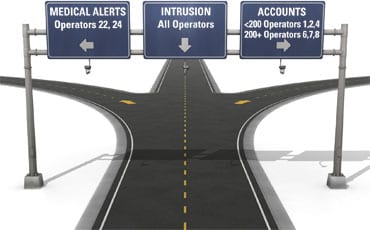
ALARM ROUTING TO OPERATORS BY SKILLSET
Specific to the Network Edition: alarm dispatching to operators is done by applying filters. Each incoming alarm is sorted by account or alarm code and routed to the correct operator or group of operators.

Use the filters to dispatch based on location of the account or location of the operator in a multi-site operation. It’s easy to dispatch alarm types to operators who got training. For example medical or emergency response to chemical incident.

ST_filters_highway-signs

LOAD BALANCING
With multiple operators you may want to insure all of them get a fair load of alarm signals to process. STnet is made to balance the load of signals between operators and to always seek the next available operator so there is no delay in processing alarms. This is especially needed if you process alarms at two sites or in large operations where communication between operators or supervisors may not be instantaneous.

It’s always possible for an operator to transfer an alarm event to another operator to insure the same operator handles all event from a subscriber or to a more senior or specially trainer operator.

scalability_networkCONNECT FROM ANYWHERE.
SECURITHOR handles the number of connection from the server. You can install at the SECURITHOR client in any number of PCs, even on multiple OS and the server will marshall who can connect.

MULTIPLE CITIES, MULTIPLE TIME ZONE
If your operation is spread in multiple cities SECURITHOR is the tool of you. It’s made to handle this. PostgreSQL adds functionality to handle multiple time zones.

LANGUAGES
SECURITHOR is already distributed with several languages. It’s easy to add another one. If we do not have your language simply contact MCDI to receive the language file. We can add your translation to SECURITHOR at not charge. You even get a free selection of an extra STM module for ST1 or extra workstation for Network Edition.

CUSTOM graphics look
OEM integrators are welcome. MCDI can personalize the user interface for OEM distribution including icon selection, graphic user interface colour and brand/name of the software. 

Android_WAM_handWEB FEATURES
SECURITHOR can handle several layers of web access. You select which service you want to deliver to your subscribers. Be sure to check Web Access dedicated page.

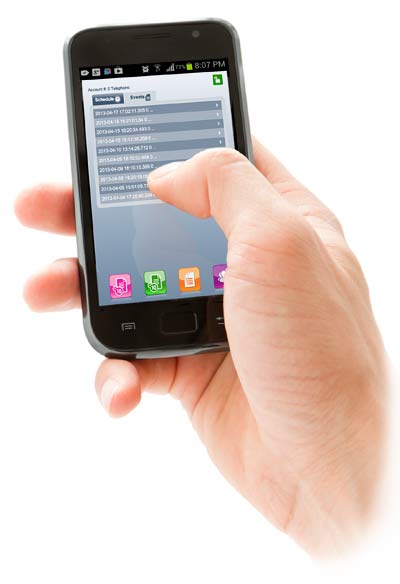
Staff can check on the operation with STM. This mobile web viewer gives you some of SECURITHOR metric right into smart phones or tablets. You know right away the traffic level of the last 24 Hours, the number of emails and sms and which operator is connected at the moment. A simplified traffic windows give you the last events right away and lets you scroll down in time.

Installers can use the WEBOPERATOR to access account they are working on. They can put and account in test mode for a limited time to check their installation without bothering operators. The normal status is restored automatically after test is concluded. Installers only have access to their own accounts. You can set their permission levels to prevent them from making changes to the accounts information.

Salesman and reseller can use WEBOPERATOR to fill accounts directly with customer even on site. All they need it web access, from a laptop or a tablet such as iPad. They build the account directly at customer site. All access rights can be limited for them and they can be prevented from looking at accounts they do not own.

Major customers with multiple accounts can either have a group access from WAM or a more complete access to their accounts using WEBOPERATOR. They can be prevented from looking at other accounts and their access level can be limited.

Subscribers have their own tool: WAM. The Web Access Module allows subscribers to view their account info, alarm history, service orders and armed/disarmed status from their pc browsers, tablets or smartphone. The Web  Access Module is on a dedicated web server so request from subscribers are never made directly to your SECURITHOR for enhanced security. Inquire to MCDI staff about the various Web Hosting possibilities for WAM.

REPORTS AND STATS
NEW FOR VERSION 2! We redesigned the reports section and added a stats module for Operators and Central station operations.

Reports section is a powerful tool. You can make reports on nearly every metric and automate report sending to Central staff or Subscribers. Start by designing your report layout or select a ready made template. Add a schedule to send the report at regular intervals or make a single on time output. Reports are send by email or saved as file in a variety of formats including text and pdf attachments

From the STATS section you can view important metrics of your Central or you can me sure the average response time of operators. It’s easy to know how many events are handled by each operator for each shift.

Reports and Stats runs as a separate application that connects to the database. You can have as many reports and stats app as you have workstation licenses for your SECURITHOR. As reports can be run from a separate PC, the load on the pc is reduced which is important is you are sending many thousands or report emails.

There is so much more in SECURITHOR. Here’s a sample of features.
You can also check the Youtube videos for a comprehensive walk through of SECURITHOR

  • Transfer alarms

    Easily transfer alarm event to another operator.

  • Stats on operator

    Know which operator handles most alarms. And know which one is faster per intervention with the Stats Module

  • Multiple languages

    We can add your translation easily If you don’t see your language among the many already in SECURITHOR.

  • Replication

    We can set many replications of the database. From Live backup module to Web Access Module, many levels of redundancy are possible

  • Delay processing

    You can put an event in pending list. It will be represented after a few minutes. Very useful to verify a false alarm or to prioritize your interventions.

  • Powerful data grid view

    Traffic windows data grid view is not only a list of the traffic. It’s the most advanced search box available to sort, find, filter alarms.

  • Skype call from ST

    Automatic dialing in Skype by click of a button. Number if transferred to Skype if it’s your preferred phone provider.

  • Auto dialing

    With a connected modem you can dial phone number directly from SECURITHOR. Faster and safer.

  • Sounds

    Wake up operators! Each incoming signal is assigned a sound according to priority level. Know right away when fire or panic signals are coming.

  • Map with each account

    Map is indexed for each account. Either from the address of from a gps location if you set-it.

  • Colour!

    Easily see event priority by the colour in traffic form. Each priority level is given a colour so it’s easy to grasp event type even if you have hundreds per minute.

  • Search armed/disarmed

    Your subscribers are always calling to know if their system is armed? Easy search of the status in SECURITHOR. Subscribers can also check using WAM.

  • GPS trail

    See position trail on map when receiving ‘follow me’ signals from subscribers APS Panic button for Android or iPhone

  • Hearbeat from alarm receiver

    Constant supervision of alarm receivers. If receiver stops sending signals for 30 seconds you are notified.

  • Updates

    SECURITHOR is under a continuous improvement program. Updates are included in your support coverage.

  • Medical identification

    Alarm codes flag for medical available. Alarm processing window show the icon so operator knows right away it’s a medical emergency.

  • Better performance

    V2 is faster than v1 by at least 30% due to new programming tools and new SQL developments.

  • Illimited accounts

    ST1 and STS versions do not have account limitation. You will not need to pay a tax to make your Central grow!

  • Live back-up

    Live back-up module can be added. Will allow operators to switch rapidly to a second system in case of emergency. MCDI can restore operation on secondary back to main.

  • Manual pick up or automatic distribution

    Let operator pick alarms or automatically dispatch according to priority level and arrival time.

  • Remote maintenance

    SECURITHOR comes with free tools for remote maintenance. You start the applications and give codes to MCDI for remote access. MCDI developers can update and troubleshoot as if he was in front of the PC.

  • Operator permissions

    No limit to number of operators. Multiple level of permissions set per operator from simple to complete rights on the system.

  • Automatic back-up

    SECURITHOR will make an automatic back up to a disk (even Network) at interval you select.

  • Comment

    Operators can write a comment for each alarm. Comment is tagged to the event so you will know what was done if you review the event months later.

  • Audit trail

    Every operator action in SECURITHOR leaves a trace.

  • Pictures

    You can attach pictures to each account. Add floor plan or rear and front picture so you can guide intervention teams.

  • Automatic image selection

    Tag one of the images to an alarm code. When this alarm code comes in for this subscribers the right image will pop. Match alarm code and zone number to an image

  • Groups

    Assign an account to a group: to an installer, to a dealer or to a major customer. Group all accounts or a store chain. This will allow more control for web features.

  • Multiple displays allowed

    You want to see anything at a glance. SECURITHOR works with multiple displays

  • Hot keys

    Hot keys can make your alarm processing faster than just using a mouse.

  • Online tutorials

    Many video walk through available on Youtube.

  • Multi processing

    Process multiple events of same kind for an account in one batch.